Elementor Review: Is It The Best WordPress Page Builder in 2022?
Trying to decide if Elementor is the right page builder for your WordPress site? In this hands-on Elementor review, we’ll help you understand:
- How Elementor can benefit you
- Who should use Elementor
- The unique features that help Elementor stand out from the competition
- Whether you should use the free version or open up your wallet for the premium version
We’ve created Astra, one of the most popular themes for Elementor, as well as a popular add-on for Elementor, so you can probably guess that we’re fans of Elementor. Let’s get that out of the way — this is a positive Elementor review.
But understanding why we like Elementor and have built products in the Elementor ecosystem is more important than just the fact that we like it — that’s what we’re going to try and communicate in this review.
By the end of our Elementor review, you should have everything that you need to make an informed decision about whether or not Elementor is the right tool for your WordPress website.
What Does Elementor Offer?
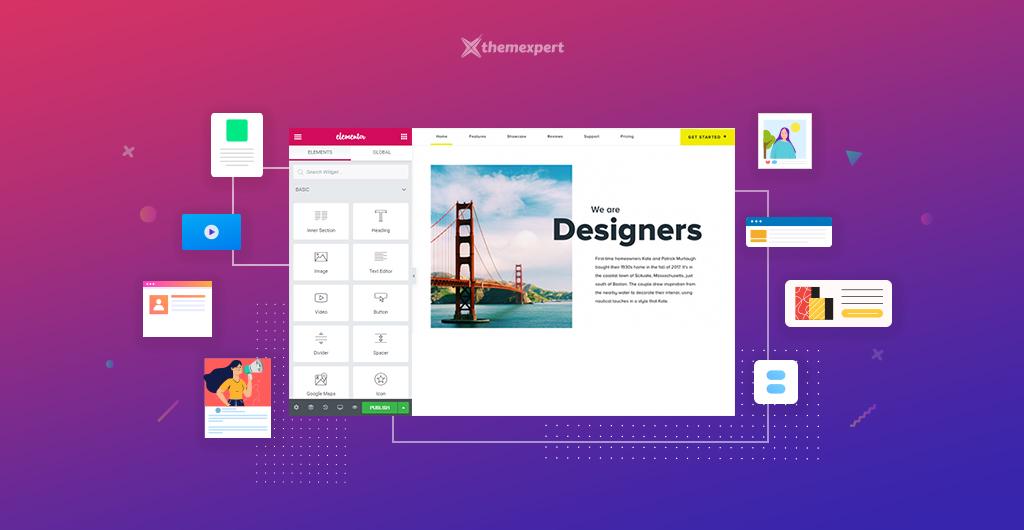
Elementor is a visual, drag-and-drop page builder. If you’re not familiar with these terms, this means that you can:
- See a preview of exactly what your page will look like to visitors as you’re building it.
- Drag and drop different content and design elements to create the perfect design.
Basically, it transforms creating a great-looking, custom web design from something you need to be a developer to do, to something that anyone can do.
Elementor is now actively used by over four million WordPress websites, which makes it the most popular WordPress page builder. It’s also maintained an impressive 4.7-star rating (out of 5) on over 5,900 reviews, so most of those users are pretty happy with Elementor.
Well, we’ll get into this in more depth later on, but some of Elementor’s standout features are:
- Lots of content elements — these are the building blocks of your page. They’re what you “drag-and-drop” to make your design.
- Responsive design — most people browse the web on smartphones, so it’s important that your designs look great on all devices. Elementor’s designs are responsive by default and you get lots of options to control how it works.
- Templates — staring at a blank page is scary! Elementor comes with hundreds of professionally designed templates so that you don’t have to start from scratch.
- Style options — you get tons of detailed style options to make your design pixel-perfect without resorting to custom CSS (though you can do that too).
- Convenience — you get lots of handy tools like right-click support, a quick find tool, and more to help you build great-looking pages faster.
- Theme Builder — with the Pro version, you can design your entire WordPress theme using Elementor
- Dynamic content — you can include dynamic content from custom fields and plugins like ACF, Pods, and Toolset.
- Popup Builder — with the Pro version, you can also design all types of popups using the same visual, drag-and-drop interface.
- WooCommerce Builder — if you’re building an eCommerce store, you can design your WooCommerce store using Elementor and include products in your other designs.
The Casual User
If you’re just a casual user looking for a way to add some style to your blog posts or build a great-looking homepage, Elementor is perfect for you.
You’ll be able to use the visual interface to spin up some great-looking designs without requiring any technical knowledge…and you’ll probably be able to do it for free! More on whether you should use the free or paid version later on.
The Digital Marketer
Elementor is great for digital marketers and teams because it includes tons of marketing elements.
For example, the Form widget in Elementor Pro lets you create all types of lead forms and connect them to popular email marketing services. It also has a Zapier integration, which lets you connect to your CRM, as well.
You can also use the Popup Builder to create opt-in popups and target them anywhere on your site. And if you’re selling products or services, you can use WooCommerce Builder to design your sales pages.
Finally, the core Elementor plugin itself is also an excellent solution for building WordPress landing pages.
The Site Builder
If you’re building sites for clients, Elementor is a perfect (and popular) choice.
You can combine Elementor with a flexible theme like Astra to build 100% custom client sites with no code required. You can also use Theme Builder when required, like and incorporating dynamic data from ACF, Pods, or Toolset.
Elementor Pricing
Short answer: It’s Free.
The base version of Elementor that is available in the WordPress Plugin repository is completely free to use. There is also a pro version with a lot more flexibility and a lot more features.
Check out our article on Elementor. Elementor Pro if you want to get a detailed review of both.
Elementor is a feature-packed plugin that works for all websites. However, it is limited at certain points.
For example, with Elementor Pro you can customize your header, footer, posts page, single posts page, or product pages.
The Elementor base version delivers the bare minimum you need to design and customize your website. But if you want to have the freedom of redesigning the entire site, Elementor Pro is the best choice.
With Elementor Pro you can also add pop-ups, contact forms, subscription forms, global widgets, and custom CSS.
Here is a list of additional features that you get in Elementor Pro:
- 50+ additional widgets
- 300+ premium demo imports including imports for header, footer, and pop-ups
- Complete website customization through Theme Builder. This lets you change the header, footer, and posts pages
- WooCommerce Builder for editing product and category pages in eCommerce websites
- Popup Builder with advanced features like, exit intent, after scroll, and controls to display certain pop-ups on certain pages
- Visual Form Builder that can be integrated with popular email marketing tools
- You can create global widgets and use them site-wide
- Add custom CSS
- Deploy any Elementor widget pretty much anywhere you want
https://be.elementor.com/visit/?bta=65541&brand=elementor
Elementor Pro Pricing
Elementor Pro has a 5 tier pricing plan based on the number of licenses you want.
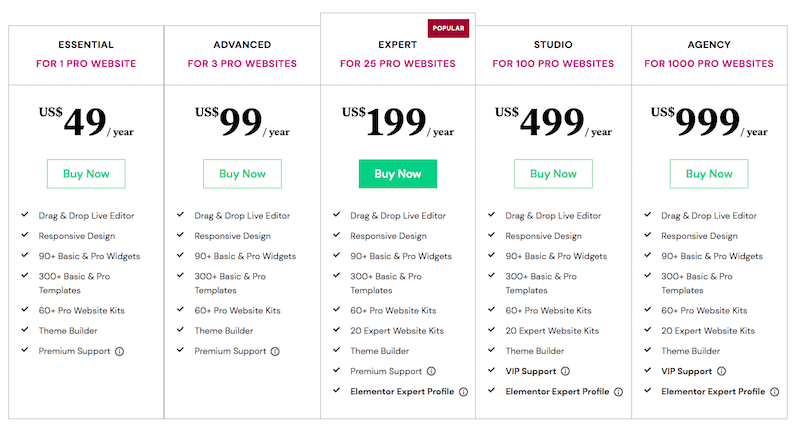
If you are working with a single website then the Essential Plan would be best for you. If you are working on multiple websites, the Advanced plan or above plans would be more suitable.
All the plans come with an annual subscription.
How Elementor Works: Touring the Interface
Let’s see how Elementor works with this practical section.
Just like any other plugin, you have to install and activate Elementor through the WordPress repository.
Next, you can either choose to customize Elementor settings or dive straight into designing.
If you are just starting out, we recommend using the default settings only. Head over to pages and open one of the pages that you want to edit.
Click Edit With Elementor to start editing.
https://be.elementor.com/visit/?bta=65541&brand=elementor
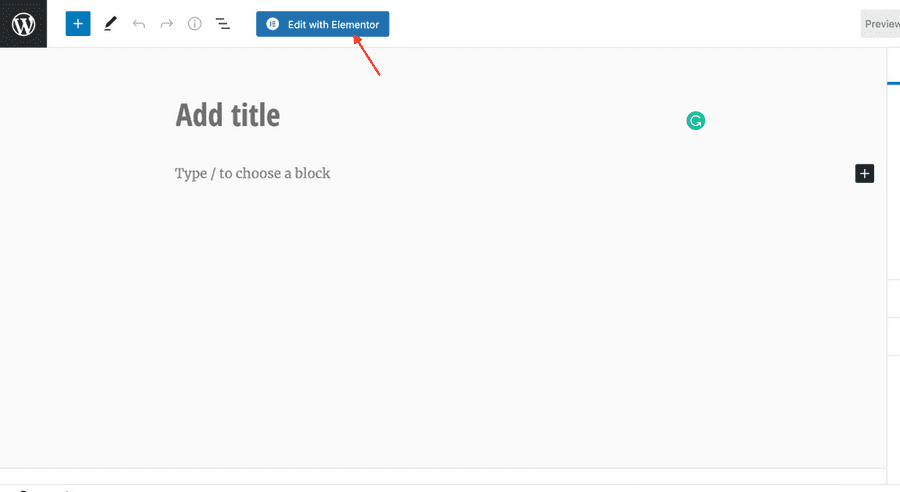
Now, let’s go through the Elementor dashboard using that demo site.
Here’s what the Elementor dashboard looks like.
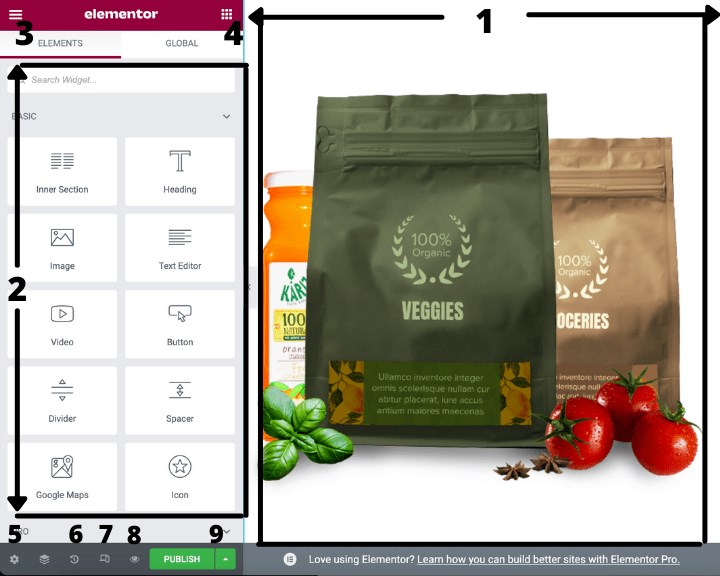
Here’s the label of different parts numbered.
- The working area or the main canvas. This is where you edit and redesign your website
- Elementor widgets area
- Elementor settings
- Open Elementor widgets
- Global settings
- Revision history
- Switch view (desktop, tablet, mobile)
- Preview changes
- Publish
https://be.elementor.com/visit/?bta=65541&brand=elementor
Eternals Review!